What is Escrow? Full Explained with Examples

What is Escrow? Full Explained With Example.

This is foe everyone out there who has little or no idea what Escrow is.
It is a financial arrangement where a third party holds and regulates payment of the funds required for two parties involved in a given transaction. It helps to make transaction secure by keeping the money in a secure escrow account.
Escrow is very usefull where a large amount of money is involved, so lets make it simple with steps.

What is Escrow?

  • Usually there are two parties first is buyer and second is seller.
  • Escrow is a third party or a third person involved in the deal.

Now lets see how escrow works.

  • Seller posts a product or service for sale that attracts a buyer.
  • And buyer wants to buy that product or deal.
  • Deal is finalized and both the parties or person agrees for escrow.
  • Buyer pays full money to the escrow.
  • Escrow then instructs the seller to deliver the promised product or service.
  • Once the product or service is delivered and buyer is satisfied, the buyer then informs the same to the escrow.
  • And escrow now releases the money to the seller.

 So here, if the buyer sends you a fake product or dosen’t send anything at all, the money is still safe with Escrow which will given back to you. So i recommend you to use Escrow if you have trust issue. 
How to remove RAR folder password easy method with steps

How to Remove RAR Folder Password

https://tomztec.blogspot.com/2019/06/how-to-remove-rar-folder-password-easy.html
Hello! guy’s today i m going to show you how to remove RAR file password. Subscribe my blog so you can get daily new tricks and more update.
So lets start the process.
  • First go to online Zip converter any you want to just google it.
  • Now browse your password protected RAR file.
  • Now click on convert file.
  • Now it will first upload this file to his server and convert it into Zip format and remove its password.
  • Now you can download the Zip file.

Isn’t it simple hope you love this trick and give it a try. 

How to make our own Private Server full explained

How to make our own Private Server

How to make our own Private Server
I’am showing you the method of Clash of Clans you can also make server of other app by this method.
First of all this might be an old method but it’s the only method i know…
This method is both for iOS and Android. It’s very simple and does not take lot of time. Just follow these simple steps.

Note: Only rooted Android devices amd jailbroken iOS device can join. And make sure to backup your village.

Creating Clash of Clans Modded Server Tutorial

  • Download the latest Clash of Clans server files (use google)
  • Extract the downloaded (RAR) file, then open the extracted folder.
  • Open the .exe file to start the clash of clans server.
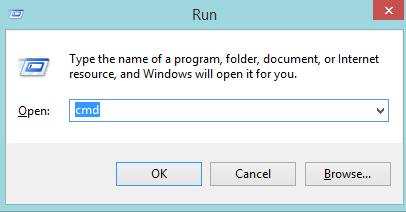
  • Open your RUN Window (windows button +R in keyboard window shown below) then type cmd and OK for going to command prompt.
  • Typing ipconfig then press enter.
  • At ethernet adapter local area connection line, copy and remember your IPv4 address.

 Follow the steps to join the CoC private server:

Android

  • Download the Host Editor(search on web you will get it). This application require root devices.
  • Tap +Add host button (top right  corner) to add new host option.
  • Type your IPv4 address in the IP address field. Type gamea.clashofclans.com in the Host name field.
  • Tap to +Add Hostname.
  • Uninstall your clash of clans.
  • Download it again from Play Store.
  • You have done. 

iOS

  • Download iFile from Cydia.
  • Open it then find/>>etcfolder.
  • Find the Host file, open it with Text editor
  • Add new line : (your IP Address) game.clashofclans.com
  • Tap the return button once (very important)
  • Save your hosts file and closeiFile
  • You have done it.

Note: you can play it on your phone, but you have to use you PC/computer as server.Till now it works fine.

How to repair Corrupted Memory Card/USB Pen Drive explained with steps

How to Repair Corrupted Memory Card/USB Pen Drive

The method is based on an uncomplicated command prompt trick that will force format your external drive, and then you can see it smoothly and error free.
However, note that this will delete all your files from USB Pen Drive and if you have any important data, Then use the Recovery tool to restore these data before implementing this method. So just follow the simple steps that I have discussed below.

Top 3 Method To Repair:

1] Connect the USB Device to Other Computer

We mostly  face SD card or Pen Drive issue due to the incompatibility or any other driver related issue. If the USB device works fine on other devices, Then you need to work on your computer other than USB or SD card. So, this is very first step you should take to check or repair your SD card or USB drive.

2] Using Troubleshooter 

Troubleshooter is the best way to sort out any kind of hardware problem. You need to just ‘Troubleshooting’ in the start menu and then under ‘Hardware and Sound’ select the option ‘Configure a Device’ and follow the on screen instruction to sort out any problem regarding USB device or other Hardware.

3]Updating USB Driver

If windows fail to read your USB Drive the outdated drivers might be another reason. Well sometimes updating the device driver could solve the problem which we are facing. Here’s how you can update device drivers.
  • First of all you need to open the RUN box and then type in devmgmt.msc ,it will open up the device manager.
  • Now you need to expand the Universal Serial Bus Controllers. Here you will see the corrupted or unrecognised USB devices as ‘Unknown Devices’.
  • Right click on the ‘Unknown Devices’ then you will see the option of update Driver, click on that.

Now if you needed an necessary update it will let you know. Simply update it will fix the problem. 

Which is the best link Shortner website in India and all over world in 2019 (with Highest rate)

Which is the best link Shortner website in India and all over the world in 2019

Hello guy’s today I’m going to tell you which link shortner website you should prefer, this website has highest CPM. Keep reading.

 GPlinks.in

GPlink is a completely free tool where you can create short links, which is free, and you get paid!
So, now you can make money from home by managing your link.

website:- www.gplinks.in

HOW AND HOW MUCH DO I EARN

How can you start making money on GPlink? It’s just 3 step create account, create a link and post it.
Down I have shown their payout rate.

RATES

COUNTRY                                                                             EARNING PER 1000 VIEWS
Canada                                                                                                       $10
United States                                                                                              $10
United Kingdom                                                                                         $8
Singapore                                                                                                    $8
Australia                                                                                                      $7
India                                                                                                             $6
Japan                                                                                                            $6
New zealand                                                                                                 $6
Netherlands                                                                                                  $6
Saudi Arabia                                                                                                 $6

Referral Bonus

This websive gives you 25% referral earning of your friend for life.

Payout

I love their payout system they have Paypal, UPI, Google pay, PhonePe etc.
I strongly prefer you to use this for best and high rate payout.
If you love my content don’t forget to comment down.


Design a site like this with WordPress.com
Get started