How to make our own Private Server
I’am showing you the method of Clash of Clans you can also make server of other app by this method.
First of all this might be an old method but it’s the only method i know…
This method is both for iOS and Android. It’s very simple and does not take lot of time. Just follow these simple steps.
Note: Only rooted Android devices amd jailbroken iOS device can join. And make sure to backup your village.
Creating Clash of Clans Modded Server Tutorial
- Download the latest Clash of Clans server files (use google)
- Extract the downloaded (RAR) file, then open the extracted folder.
- Open the .exe file to start the clash of clans server.
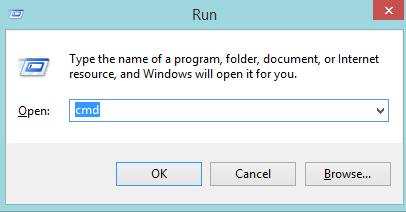
- Open your RUN Window (windows button +R in keyboard window shown below) then type cmd and OK for going to command prompt.
- Typing ipconfig then press enter.
- At ethernet adapter local area connection line, copy and remember your IPv4 address.
Follow the steps to join the CoC private server:
Android
- Download the Host Editor(search on web you will get it). This application require root devices.
- Tap +Add host button (top right corner) to add new host option.
- Type your IPv4 address in the IP address field. Type gamea.clashofclans.com in the Host name field.
- Tap to +Add Hostname.
- Uninstall your clash of clans.
- Download it again from Play Store.
- You have done.
iOS
- Download iFile from Cydia.
- Open it then find/>>etcfolder.
- Find the Host file, open it with Text editor
- Add new line : (your IP Address) game.clashofclans.com
- Tap the return button once (very important)
- Save your hosts file and closeiFile
- You have done it.
 TomzTech